Sound
Shape it your way.
A simple equaliser for everyone, and two Pro versions when you want to go further. All of them work on your own files.
Simple
Five bands and thirteen presets, from Flat, Warm and Bass to Jazz, Podcast and Small speakers. Drag a band up or down and hear it change.
Pro A Pro
Ten bands, each with its own frequency and width, a filter type for each, and the sound tools below: bass, loudness, stereo width, crossfeed, a compressor, a limiter, Compare and your own presets.
Pro B Pro
Everything in Pro A, and the full set for a serious listener: a live response curve, exact numbers, switching a band off, Match loudness, your own compressor settings and a built-in guide. Switch between Simple, Pro A and Pro B from the buttons under the title.
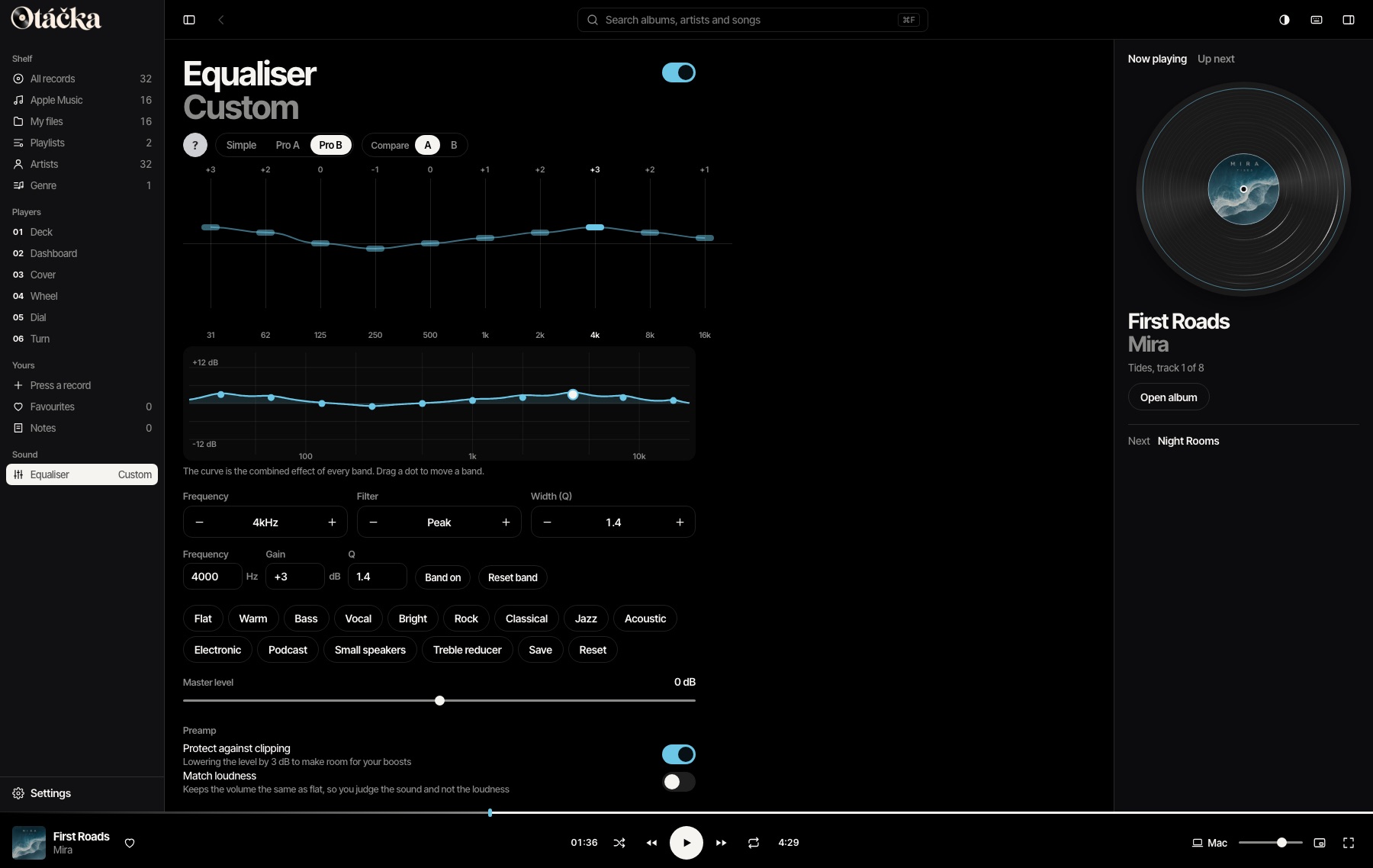
The Pro B equaliser on a Mac, with sample albums.
Pro tools
Pro A has the tools without a tag. Pro B has all of them, including those marked Pro B.
Filter type
Make any band a peak, a low shelf, a high shelf, a low pass, a high pass or a notch.
Frequency and width
Move a band in thirds of an octave and make it wide or narrow.
Protect against clipping
Lowers the level for you when your boosts would push it too far, and tells you by how much. On by default.
Bass boost
Up to 8 dB of extra low end.
Loudness
Lifts bass and treble as the volume goes down, so quiet listening still sounds full.
Stereo width
From mono, through as recorded, to twice as wide.
Headphone crossfeed
Mixes a little of each side into the other, the way speakers in a room would.
Compressor
Off, Gentle or Strong. Evens out loud and quiet parts.
Limiter
Stops sudden peaks from clipping.
The curve Pro B
A graph of the combined effect of every band. Drag a dot to move a band, and see what you are doing to the sound.
Exact numbers Pro B
Type a frequency, a gain or a width, down to a fraction of a decibel. Switch a band off to hear what it does, or reset it.
Match loudness Pro B
Keeps the volume the same as flat, so you judge the sound and not the loudness when you compare.
Your own compressor Pro B
Set the threshold, ratio, attack, release and makeup gain yourself, and the limiter's release too.
A built-in guide
A question mark opens a plain guide to every control, so you can learn the Pro section as you go.
Compare A and B
Set up two versions and switch between them with one press, to hear what you changed. The two buttons sit side by side and the one in use is lit.
Your own presets
Save a setting with a name. Export your presets to a file and import them on another Mac, or from a friend.
A preset for an album
Choose a preset for an album or a genre and it switches in when that album starts.
Remembers your output
Headphones and speakers each keep their own settings, and come back when you plug them in.
How the sound travels
Apple Music songs are protected, so none of this can change them. It works on your own files. The Mac version is shown. The phone prototype shows the same tools. Details may change before release.